

One of the many roles of a modern smartphone is being a source of games. That’s why a huge portion of mobile apps are games. Among them, the spinning wheel (roulette-style) game is one of the most attractive: it requires no effort or thinking and is associated with luck and lottery.
Let’s look at a common task: animating a spinning lottery wheel.
A bit of physics: the wheel should gradually slow down due to friction, so we need not just rotation, but a smooth deceleration until it stops.
A bit of game design: each spin should start with a different initial speed — this creates the feeling of randomness and makes the outcome unpredictable.
And a bit of realism: this speed can’t be absolutely anything.
- If it’s too slow, it looks boring — if the wheel completes fewer than a few rotations, the game won’t feel exciting.
- If it’s too fast, it looks unrealistic — a person physically can’t spin it infinitely fast.
So, let’s begin.
.NET MAUI offers a whole set of built-in methods for animating UI elements: RotateTo, ScaleTo, FadeTo, TranslateTo. They apply to any class derived from VisualElement. VisualElement is the base class for visual controls:
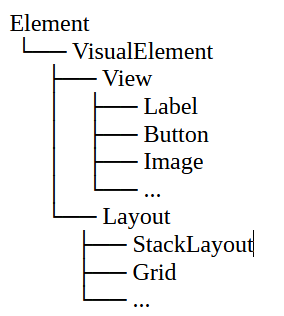
The static class ViewExtensions works with these elements and provides animation methods (all asynchronous in current versions). For example:
RotateToAsync(VisualElement element, double rotation, uint length, Easing easing)
— rotates the element to the given angle, over the given number of milliseconds, using the specified easing function (Easing.Linear, Easing.SinInOut, Easing.CubicOut, or your own custom function).
ScaleToAsync scales the element relative to its center.
FadeToAsync gradually changes the opacity from the current value to the specified one.
For example, FadeTo(0, 500) means fading out over 500 ms, and label. FadeTo(1, 500) means fading back in.
TranslateToAsync moves the element relative to its original position.
All methods return a Task so you can combine them with await. You can also run several animations in parallel, for example:
await Task.WhenAll(
    image.RotateTo(360, 1000),
    image.ScaleTo(1.2, 1000),
    image.FadeTo(0.5, 1000)
);
This smoothly changes three properties of the element at once.
As you can guess, for our case we’ll use RotateTo.
A call like this:
await image.RotateTo(360, 1000, Easing.CubicOut);creates a fast start and a gradual deceleration of the wheel.
Here are a few useful Easing options:
- Easing.Linear — uniform rotation
- Easing.CubicIn — acceleration
- Easing.CubicOut — deceleration
- Easing.CubicInOut — slow start, fast spin, slow stop
(To be honest, I once implemented my own angle-calculation mechanism: computing angles manually, redrawing the image, and gradually reducing speed. It worked, the wheel spun beautifully, and I was proud of my custom algorithm.)
What makes our lottery wheel feel natural?
Parameter 1. A random number of full rotations. A realistic result would be a few full turns — say, from 3 to 8.
Parameter 2. A random final stopping angle (integer degrees from 0 to 359).
Something like this:
double finalRotation = 360 * _random.Next(3, 9) + _random.Next(0, 360);
                                          // ^ Note: 9 is exclusive
await WheelImage.RotateToAsync(finalRotation, 4000, Easing.CubicOut);
Right?
Incorrect.
This uses a constant duration in milliseconds — but duration actually depends on the initial speed.
So:
Parameter 3. A computed duration. It depends on the total rotation angle.
uint duration = (uint)(Math.Abs(finalRotation) / degreesPerMillisecond);
await wheel.RotateToAsync(finalRotation, duration, Easing.CubicOut);
Parameter 4. We don’t always start from zero. If the wheel stopped at some angle last time, that’s the starting angle.
double finalRotation = 360 * _random.Next(3, 9) + _random.Next(0, 360) - startAngle;
uint duration = (uint)(Math.Abs(finalRotation) / degreesPerMillisecond);
await wheel.RotateToAsync(startAngle + finalRotation, duration, Easing.CubicOut);
Now here is the complete example:
public class WheelGame
{
    private readonly Image _wheel;
    private readonly string[] _prizes; // List of sectors/prizes
    private readonly Random _random = new();

    public WheelGame(Image wheel, string[] prizes)
    {
        _wheel = wheel;
        _prizes = prizes;
    }

    /// <summary>
    /// Starts the game: spins the wheel and returns the winning prize
    /// </summary>
    public async Task<string> PlayAsync()
    {
        // Current wheel angle
        double startAngle = _wheel.Rotation;

        // Random number of full rotations (3–8)
        int turns = _random.Next(3, 9);

        // Random stopping angle (0–359)
        int randomAngle = _random.Next(0, 360);

        // Total rotation relative to current angle
        double finalRotation = 360 * turns + randomAngle - startAngle;

        // Duration depends on rotation speed
        double degreesPerMillisecond = 0.1; // Adjust to speed up / slow down
        uint duration = (uint)(Math.Abs(finalRotation) / degreesPerMillisecond);

        // Spin the wheel
        await _wheel.RotateToAsync(startAngle + finalRotation, duration, Easing.CubicOut);

        // Actual stopping angle (0–359°)
        double landedAngle = (startAngle + finalRotation) % 360;

        // Determine sector
        int sectorCount = _prizes.Length;
        double sectorAngle = 360.0 / sectorCount;
        int prizeIndex = (int)(landedAngle / sectorAngle);

        return _prizes[prizeIndex];
    }
}